Pinning
Friday, July 29, 2011
Surely everyone must be at least semi-familiar with Pinterest by now, right?
If you ARE familiar, are you registered (and therefore addicted) yet? Or have you been holding out, and have not yet checked it out for yourself?
If you AREN'T familiar, have you been living under a rock? (Relax; I'm KIDDING!)
I feel like I need to fulfill my duty to spread the Pinterest love. Because, well, Pinterest is pretty much the greatest thing since sliced bread. (In fact, I wish I had thought of it. I'd probably be well on my way to being a rich woman right now.)
You know the "Bookmarks" folder in your browser that is full of random websites, half of which you're not sure why you bookmarked in the first place, until you click on them again?
You know the "starred posts" in your Google Reader, that are terribly unorganized?
You know the searches you do in Google images, when you're desperate for inspiration?
Pinterest is the answer to all of these things. Pinterest is bookmarks + starred posts + Google images + a smidge of a Facebook feed thingy-majig. It's awesome. Trust me.
When you first log in, this is the landing page that you see. This is the "Facebook feed thingy-majig" that I am talking about. Here, you see all of the recent "pins" that have been posted by the people you "follow."
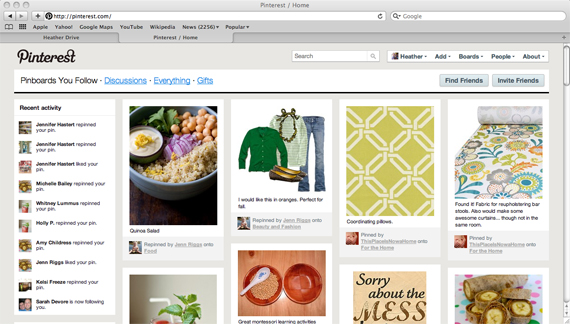
So here, I see my friend Jenn has pinned (a.k.a. bookmarked) a recipe for quinoa salad, as well as a style board for an outfit that is inspiration for fall. Kate over at This Place is Now a Home has pinned a few fabric samples that she plans to use for throw pillows and bar stools. If I, too, like any of these things--take the quinoa salad recipe, for example--I can "repin" the recipe to my own boards (read: "folders" for your bookmarks).
Here is what my board set-up currently looks like:
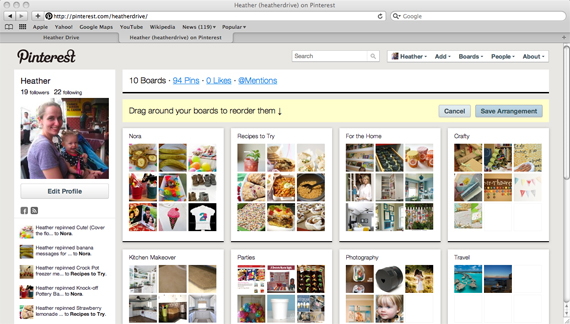
Currently, I have boards for categories such as "Nora," and "Recipes to Try," "For the Home," "Crafty," "Kitchen Makeover," "Parties," "Photography," and "Travel." As I browse through the photos pinned by all of the people I follow, I can repin their items to my own boards for future reference. It doesn't stop there, though. If I'm browsing around on the internet, and come across something I want to save, I can pin that page to my boards as well, by selecting "Add" then "Pin," and entering the URL. Cool, huh?
When bored, you can also look at ALL of the recent pins on Pinterest--not just the pins from the people you follow. That's a fun way to find random inspiration, I assure you! Looking for something specific? You can SEARCH Pinterest as well.
You pin things to your board using images that are on that particular web page. So, when you go back to look for something later, it's easy to find, thanks to the image and the description you choose to put underneath. Want ideas for dinner? Go to your recipes board, and drool as you scroll through all of the photos you've pinned. Find something you're in the mood for? Click on it, and you will be taken back to the source of the photo, so you can easily access the recipe you need.
The best way to familiarize yourself with it and get the hang of it is just to sign up and try it out! For some reason, Pinterest still requires an invite in order to log in. If you are interested and don't have an invite, feel free to leave your e-mail address in the comments and I'll send you one. Please be patient with me through the weekend, though, as I *might* not get to the invites until late Sunday or Monday.
If you are on Pinterest and would like to "follow" me, click here. I would love to have some new people to follow as well.
Questions? Still not sure what the heck Pinterest is all about? Ask away in the comments, and I will do my best to answer (or maybe some of my Pinterest-obsessed readers can help out as well).
PIN ON! :)
Read more...




 Posts
Posts

